

7 Installation Mistakes That Sabotage Your Backup Camera Performance
Most of the time, if a reverse camera acts up, it is often assumed to have an issue with the camera, causing the failure.
But here is the twist, in most cases, your camera is perfectly fine, but the installation may be the reason that lets it down.
A backup camera is a simple tool sitting on top of a delicate setup. The wrong installation process or overlooking simple steps can lead to the system becoming unpredictable. And because these problems start small, but eventually lead to safety hazards.
To help you avoid that, here is a clear and practical look at what installation mistakes you might be making that compromise the performance of your backup camera.
What Mistakes You Might Be Making & How To Fix Them In The Right Way?
Here are some of the mistakes you need to fix during installation, and what are the ways you can avoid them.
1. Poorly Planned Cable Routing
How you run your camera cable for car setup plays a key role in its reliability.
If it's a poorly routed cable, then it may work fine on day one, but it causes damage later when it gets heated or when friction wears it down.
The problem mostly starts when the cable rubs against the sharp metal edges. Wire bends every time your trunk or hatch opens,
Or it sits near the heat sources, like exhaust piping or unfused battery feeds. These make your cable vulnerable to melting or electromagnetic noise, leading to flicker in videos and lost feeds.
Or it sits near the heat sources, like exhaust piping or unfused battery feeds. These make your cable vulnerable to melting or electromagnetic noise, leading to flicker in videos and lost feeds.
How To Fix It?
It's best to plan your cable path before you install your system.
Also, use factory grommets or rubber boots to ensure your wires pass safely through the panels and avoid any unnecessary movements or heating issues.
Also Read: A Comprehensive Guide On Routine Maintenance For Vehicle Camera Systems
2.Power Connections & Grounding
When using, you shift into reversing, and the images on your feed appear late or cut out, then the problem is ideally related to unstable power.
These systems are sensitive as they need proper connections and grounding to function.
If the power is unreliable or has inconsistent voltage, it can be a top cause of the random blackouts or ‘ sometimes’ working camera.
How To Fix It?
- To fix, use a delicate fused 12V line rather than piggybacking on questionable OEM wiring
- Also, strip the ground area to bare metal to provide solid contact.
- Avoid quick splice taps, even though they speed up but soldered or crimped connections wrapped using heat shrink tubing can last far longer.
3.Confusion With Red Trigger Wire
When you run a standard RCA video cable from your camera to the display, and there is a noticeable thin ‘ red pigtail’ wire running alongside. In that case, this tiny wire is as it's assumed to trigger power.
But it can cause voltage drops, image loss, and resetting the camera after hitting bumps.
That's because the wire cannot carry enough current to your camera, especially for long distances in pickups, vans, and SUVs.How To Fix It?
Either you use a thicker gauge wiring for the power run, or you can run a separate high-quality cable for your 12V feed. Also, treat your red wire only for the signal or trigger.
4. Ignoring Your Own Vehicle Specific Requirements
Installing a camera system doesn't follow a sample playbook.
Depending on what you drive, the requirements can change. For example, you can't use sedan wiring routes if you're installing on SUVs.
The same goes for mounting points, if it's a plastic surface, then they often cause vibration at high speed.
Besides, the camera angle may differ if you have a truck that requires a different placement to work effectively.
How to fix it?
- Before you do routing, tapping, or drilling, start by checking the cervical manual of your vehicle.
- The manufacturers often add safe wiring paths and specify where the structural mounting points are.
- Following these can help in improving camera feed, but also protect your vehicle from warranty issues.
5. Running Your Wires Near High Interference Zones
When cable runs near high current lines, it can be alternator cables, defrosters, or amplifier wires, it causes electrical noise which leads to your videos getting interference.
These can also show up as :
- Rolling lines on your screen
- Overlay graining images
- Static or buzzing-like issues
- Random flickers
How To Fix It?
Try to keep your video cable away from these to prevent causing issues. If it's not possible, then use a shield cable for your system.
6. Low Quality Connectors & No Heat Shrink
Even using a premium system can end up malfunctioning if the connectors are poor or exposed to weather changes.
Moisture is and always will be an enemy of stable video singles to the point where even one drop can degrade the picture quality instantly.
Some of the common oversights that happen include:
- Using electrical tape alone, which gets loose with heat.
- Plug your RCA connector without moisture barriers.
- Not locking your quick-connect coupler completely.
- Mixing connector types from different brands.
- Reversing multiple times to check for any issues
- Checking images in poor light conditions
- Wiggling the truck to see if there are any loose connectors
- Making sure your camera angles are directed to the right direction, i.e., bumper and ground.
How To Fix It?
To protect your system, use heat shrink tubing along with weatherproof connectors and dielectric grease. These small additions during installation can improve long-term reliability.
7. Skipping The After Test Of the System
A lot of mistakes or issues can be fixed if you do a proper test before reinstalling panels. It's relatively easy to fix before you screw everything back into its place.
How To Fix It?
For example, when you do a test, it includes :
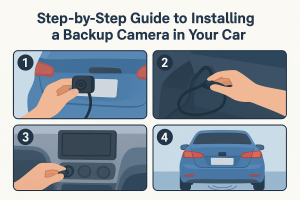
Must Read: Step-by-Step Guide to Installing a Backup Camera in Your Car
Conclusion
A proper installation makes your system perform its best. Even the premium quality can struggle if you're doing sloppy routing or dealing with weak grounding.
But with smart planning, clean power, better angels, protected wires, and thorough testing make a trustworthy system you can rely on every time you shift into reverse.
Paying attention to details during installation, the backup camera system is consistent and exactly what you need for your vehicle.
Rear View Safety takes safe driving for every industry that needs whether you drive commercial trucks or vans.
We protect the drivers, vehicle owners, and pedestrians, utilizing the most innovative camera system technology, so you stay safe and satisfied on the road.
Find an Innovative & Industrial-Designed Backup Camera System
Find an Innovative & Industrial-Designed Backup Camera systems